Trusted Artifact Signer — Container Signing
1. Module Goals
Learn keyless signing and verification with Red Hat Trusted Artifact Signer (TAS)—the Sigstore-based component of the Red Hat Trusted Software Supply Chain product family.
2. Trusted Artifact Signer
Red Hat Trusted Artifact Signer simplifies cryptographic signing and verification of container images, binaries, and documents using a production-ready Sigstore deployment.
2.1. Why Sigstore / Trusted Artifact Signer?
-
Supply chain security — secure dependencies and artifacts at scale
-
Usability — no long-lived GPG key distribution
-
Transparency — Rekor tamper-evident signature log
-
Modern identity — OIDC-bound signing certificates
-
Automation — fits CI/CD pipelines natively
Sigstore/TAS improves on GPG with keyless signing, transparency logs (Rekor), and OIDC-bound identities.
3. Setup
| Run the following command to ensure the environment is up to date: |
This module uses the Quay image from Build a container image. Re-run that section if $QUAY_USER or $QUAY_URL are unset.
3.1. Setting up the environment variables
echo $QUAY_USER
echo $QUAY_URL
export TUF_URL=$(oc get tuf -o jsonpath='{.items[0].status.url}' -n trusted-artifact-signer)
export OIDC_ISSUER_URL=https://$(oc get route keycloak -n rhsso | tail -n 1 | awk '{print $2}')/auth/realms/openshift
export COSIGN_FULCIO_URL=$(oc get fulcio -o jsonpath='{.items[0].status.url}' -n trusted-artifact-signer)
export COSIGN_REKOR_URL=$(oc get rekor -o jsonpath='{.items[0].status.url}' -n trusted-artifact-signer)
export COSIGN_MIRROR=$TUF_URL
export COSIGN_ROOT=$TUF_URL/root.json
export COSIGN_OIDC_CLIENT_ID="trusted-artifact-signer"
export COSIGN_OIDC_ISSUER=$OIDC_ISSUER_URL
export COSIGN_CERTIFICATE_OIDC_ISSUER=$OIDC_ISSUER_URL
export COSIGN_YES="true"
export SIGSTORE_FULCIO_URL=$COSIGN_FULCIO_URL
export SIGSTORE_OIDC_ISSUER=$COSIGN_OIDC_ISSUER
export SIGSTORE_REKOR_URL=$COSIGN_REKOR_URL
export REKOR_REKOR_SERVER=$COSIGN_REKOR_URL
cosign initialize| Cosign and gitsign read overlapping Sigstore environment variables for compatibility with upstream tooling. |
4. Signing and verifying a container image
Log in to Quay, inspect the image, then sign it interactively:
cosign login $QUAY_URL -u $QUAY_USER -p {quay_admin_password}
cosign tree $QUAY_URL/$QUAY_USER/frontend:0.1
cosign sign $QUAY_URL/$QUAY_USER/frontend:0.1
When browser login fails in SSH, copy the URL into a new tab and authenticate as jdoe@redhat.com / secure. Paste the full verification code when prompted.
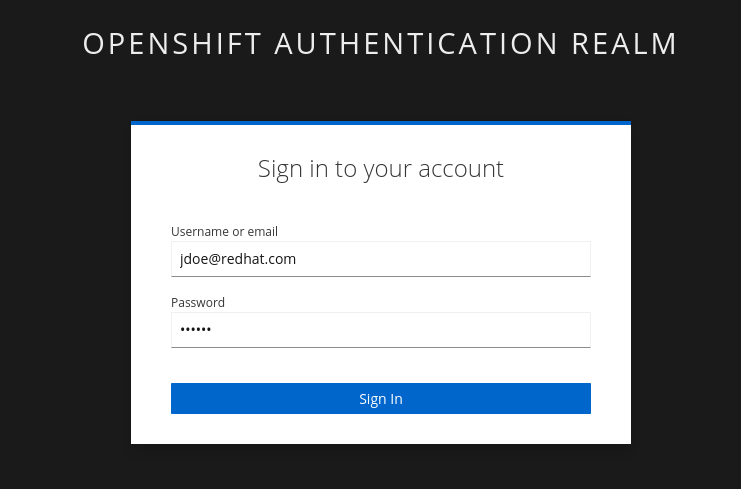
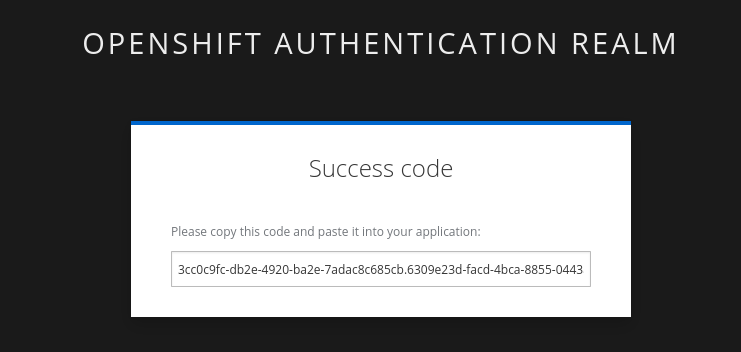
Expected: Rekor records the event (tlog entry created with index: …) and the signature appears in cosign tree.
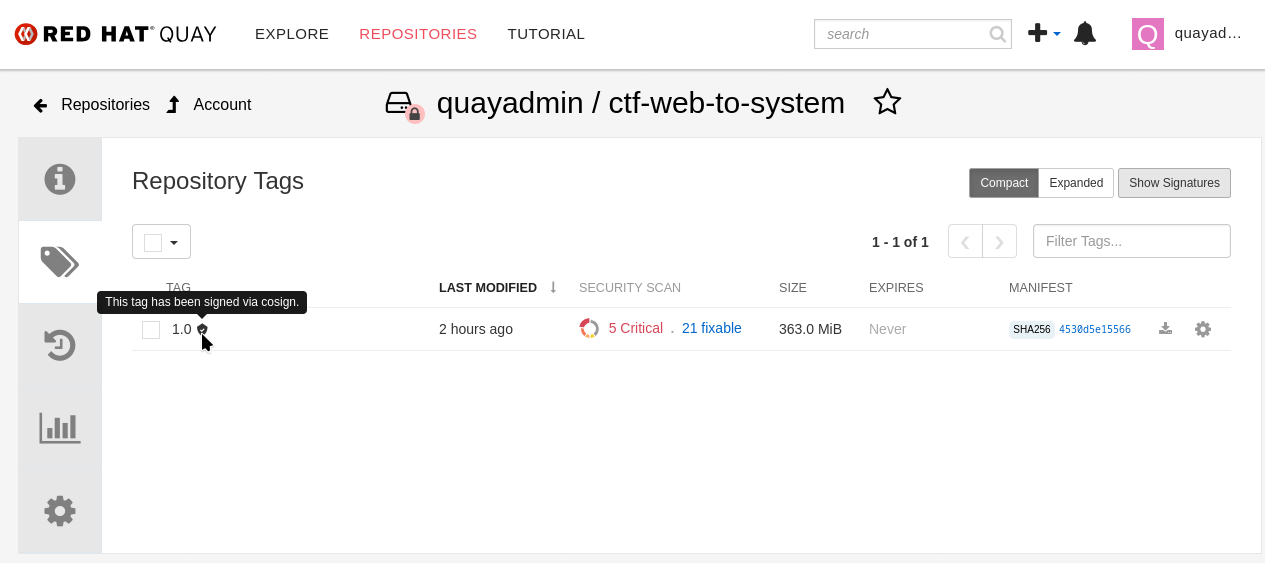
| Pipelines use OIDC tokens instead of browser login. Request a token from Keycloak and pass it to cosign: |
export OIDC_TOKEN_SERVICE=$(curl -s $OIDC_ISSUER_URL | jq -r '.["token-service"]')/token
export OIDC_TOKEN=$(curl -s --request POST --url $OIDC_TOKEN_SERVICE \
  --header 'content-type: application/x-www-form-urlencoded' \
  --data 'grant_type=password' --data 'client_id=trusted-artifact-signer' \
  --data 'username=jdoe@redhat.com' --data 'password=secure' --data 'scope=openid' \
  | jq -r '.["access_token"]')
cosign sign -y --identity-token=$OIDC_TOKEN $QUAY_URL/$QUAY_USER/frontend:0.1
4.1. Verifying signatures
cosign verify --certificate-identity jdoe@redhat.com $QUAY_URL/$QUAY_USER/frontend:0.1 | jq
cosign verify --certificate-identity-regexp ^[a-zA-Z0-9._%-]@redhat\.com$ $QUAY_URL/$QUAY_USER/frontend:0.1 | jq
cosign verify --certificate-identity jdoe@redhat.com --certificate-oidc-issuer-regexp \.opentlc\.com $QUAY_URL/$QUAY_USER/frontend:0.1 | jq
5. Summary
With TAS you get:
-
Signed artifacts via Sigstore clients (cosign/gitsign)
-
Identity-bound certificates from Fulcio
-
Witnessed events in the Rekor transparency log
6. Next module
Continue to Git Commit Signing.