1.1 Verify Hummingbird
Overview
You verify a published Project Hummingbird / Red Hat Hardened Images runtime with cosign before anything is mirrored. You discover the workshop pin from cluster userinfo, complete the incomplete ConfigMap, and run cosign verify against that published digest.
Why it matters
Unsigned or unverified bases undermine every later signature, SBOM, and admission decision. Lightwell Network and Lightwell Clearinghouse Premier remediate application libraries. They are not this FROM. Hummingbird is the OS and runtime layer. A Premier GAV still needs a verified base.
What does it solve
-
Runtime bases that were never signature-checked
-
Mutable tags such as
:latestinstead of a digest pin -
Mixing the Hummingbird Red Hat key with in-cluster RHTAS
-
Treating Lightwell as a runtime substitute
Why verify before you mirror
UBI is a general-purpose base image. Red Hat Hardened Images (registry.access.redhat.com/hi/…) are a minimal, signed runtime with a smaller attack surface and no package manager in the image. They are built for production constraints.
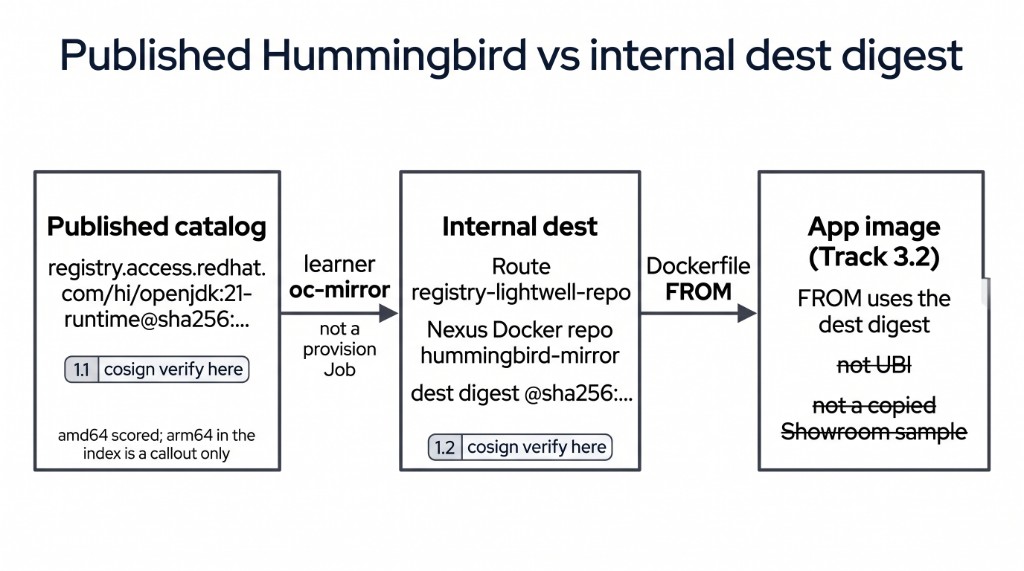
1.1 proves the published coordinate. 1.2 copies that trust into the cluster dest. Track 3 is when application FROM switches.
|
A Hummingbird Python runtime uses the same verify story ( |
Prerequisites
-
Bastion or Showroom terminal after Environment setup on the Welcome page (
setup/lab-environment.sh). That script installscosign,oc-mirror, andecinto~/.local/binfrom Red Hat images. Do not curlgithub.comfor CLIs. -
ConfigMap
demo-userinfo-lightwell-repoin namespacelightwell-repo. -
If
command -v cosignprints nothing, runsource ~/.bashrcor re-run the Welcome setup block.
command -v cosign
command -v oc-mirror
cosign version
oc-mirror version
Discover the published pin
Do not paste a digest from chat, a slide, or this page’s narrative. The live pin is userinfo.
oc -n lightwell-repo get configmap demo-userinfo-lightwell-repo \
  -o jsonpath='{.data.hummingbird_source_pullspec}{"\n"}{.data.dest_registry_host}{"\n"}'
Keep the pull spec. The @sha256:… on that line is the index (it may list more than amd64). This cluster and this Check are amd64. Dual-arch hands-on is out of this lab.
Here’s an example for you
The following verifies a different image with a non-Red Hat key URL. If your Check uses this block unchanged, it fails.
# Worked example ONLY — ubi-minimal + a key that is not Red Hat Hardened Images.
cosign verify \
  --key https://example.invalid/not-redhat-hardened-images.pub \
  --insecure-ignore-tlog \
  registry.access.redhat.com/ubi9/ubi-minimal:latest
Your change: complete the verify ConfigMap
The Check grades ConfigMap stub-01-hummingbird-verify in namespace lightwell-repo, key published-verify.sh. That key is a short shell script. It ships with two placeholders. You copy it to your home directory, fill those two strings, then write the file back onto the same ConfigMap. A file that exists only on the bastion does not pass. Leave REPLACE_ME in the cluster object and the Check fails.
There are exactly two substitutions.
| Placeholder in the seed | What you put there |
|---|---|
|
The |
|
|
Do not paste the ubi-minimal worked example. Do not use an in-cluster Fulcio or Rekor URL. This Check is Red Hat’s published key, not Track 5 RHTAS.
oc -n lightwell-repo get configmap stub-01-hummingbird-verify \
  -o jsonpath='{.data.published-verify\.sh}' > ~/track-1-1-published-verify.sh
cat ~/track-1-1-published-verify.sh
You should see both REPLACE_ME_* strings. The seed looks like this:
#!/usr/bin/env bash
set -euo pipefail
export HUMMINGBIRD_PUBLISHED='REPLACE_ME_HUMMINGBIRD_PULLSPEC'
cosign verify \
  --key REPLACE_ME_COSIGN_KEY \
  --insecure-ignore-tlog \
"${HUMMINGBIRD_PUBLISHED}"PIN="$(oc -n lightwell-repo get configmap demo-userinfo-lightwell-repo \
-o jsonpath='{.data.hummingbird_source_pullspec}')"
echo "PIN=${PIN}"
test -n "${PIN}"
cat > ~/track-1-1-published-verify.sh <<ENDSCRIPT
#!/usr/bin/env bash
set -euo pipefail
export HUMMINGBIRD_PUBLISHED='${PIN}'
cosign verify --key https://security.access.redhat.com/data/63405576.txt --insecure-ignore-tlog "\${HUMMINGBIRD_PUBLISHED}"
ENDSCRIPT
chmod +x ~/track-1-1-published-verify.sh
cat ~/track-1-1-published-verify.shThe PIN= line must be a registry.access.redhat.com/hi/openjdk pull spec with @sha256:. The script body must show that pull spec and the 63405576.txt key URL, with no REPLACE_ME.
See Verify the integrity of Red Hat Hardened Images for why that key URL is the documented non-RHEL verify pattern. That host is Red Hat key distribution, not github.com. If the fetch is blocked, stop and tell an instructor.
oc -n lightwell-repo create configmap stub-01-hummingbird-verify \
  --from-file=published-verify.sh=$HOME/track-1-1-published-verify.sh \
--dry-run=client -o yaml | oc apply -f -oc -n lightwell-repo get configmap stub-01-hummingbird-verify \
-o jsonpath='{.data.published-verify\.sh}'
echo
oc -n lightwell-repo get configmap stub-01-hummingbird-verify \
-o jsonpath='{.data.published-verify\.sh}' | grep -E 'REPLACE_ME' \
&& echo 'STILL HAS PLACEHOLDERS' || echo 'placeholders gone'Check: published cosign verify
hi/openjdk pin~/track-1-1-published-verify.shThe Job also grades ConfigMap report-01-hummingbird-verify key consume_published. Set it to consume-published. Empty or REPLACE_ME fails even if cluster state is correct. Do not copy validate-docs.
oc -n lw-poc-validate edit configmap report-01-hummingbird-verifyThe scored Check is Job validate-01-hummingbird-verify in lw-poc-validate. Direct nav URLs still work (honor system). Unlimited retries. There is no Solve.
oc -n lw-poc-validate delete job validate-01-hummingbird-verify --ignore-not-found
TPL='job-01.yaml'
oc -n lw-poc-validate get configmap validate-job-templates \
  -o go-template="{{ index .data \"${TPL}\" }}" | oc create -f -
oc -n lw-poc-validate logs -f job/validate-01-hummingbird-verify
Expect CHECK PASSED: before you continue. CHECK FAILED: names the object to fix. Delete the Job and create it again as often as you need.
Honor system: later modules still open if you skip this. The Validate Job grades the ConfigMap (no REPLACE_ME, digest matches userinfo) — not a screenshot of this terminal.
Do not:
-
Pre-mirror or start Job
oc-mirror-learner(that is 1.2) -
Change the application
DockerfileFROM(Track 3) -
Treat in-cluster RHTAS issuer/subject as this Check (those sign your app in Track 5)
Callout: multi-arch
The catalog index for this pin may list arm64 alongside amd64. This cluster and this Check are amd64. The pull spec you recorded is the index digest. You do not run a second architecture in the lab.
Official documentation
-
Lightwell (Network and Clearinghouse Premier; complementary to Hardened Images, not a replacement)
Key takeaways
-
TSSC starts with a signed published runtime. You consume Hummingbird. You do not rebuild the factory.
-
Verify the published digest before you mirror. 1.2 is a separate Check on the internal digest.
-
Lightwell Network / Clearinghouse Premier remediate libraries. They are not this
FROM. -
cosignandoc-mirrorcame from Welcome Environment setup (~/.local/bin). You did not download them from GitHub.
cd ~/ocp5-rhacs-showroom
bash setup/lab-cleanup.sh --module tssc-01