4.3 Build NetworkPolicy
Overview
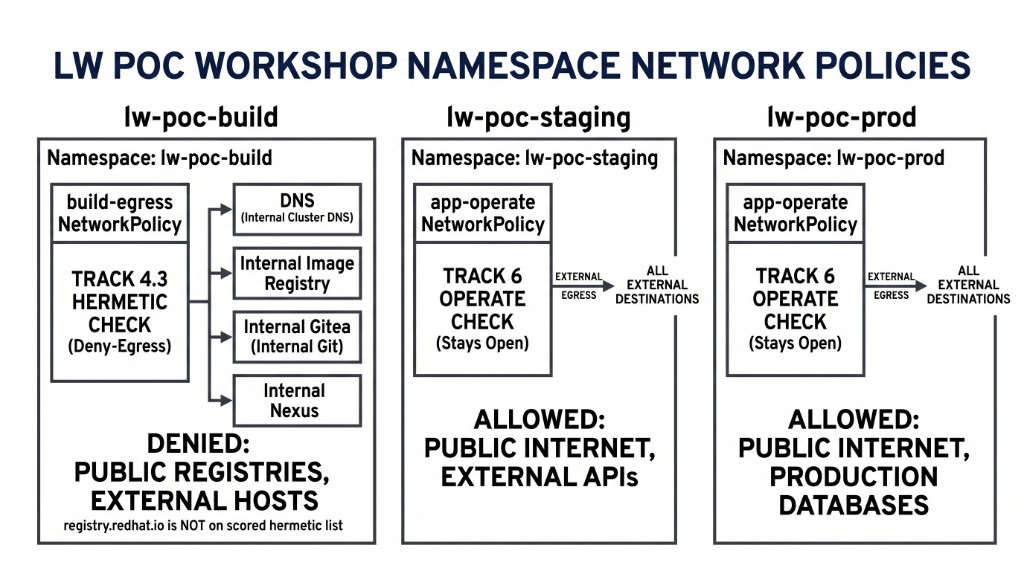
Tighten NetworkPolicy build-egress on lw-poc-build from allow-all to deny-egress plus DNS, registry, Nexus, Gitea, and the Kubernetes API. 4.4 clone and oc start-build need those last two. Do not allow public registry hosts or the worked-example 8.8.8.8.
Do not copy this policy onto lw-poc-staging or lw-poc-prod. app-operate stays operate (Track 6).
Why it matters
Hermetic must be enforced at the network, not only in grep. After you tighten build-egress, Maven Central, public registries, and even the Nexus Route fail from lw-poc-build for real. Lightwell Network GAVs must use the in-cluster Nexus service. Gitea clone must use the in-cluster URL.
Build NP is not app operate. Clearinghouse Premier does not need packages.redhat.com on this allow-list. Member artifacts are already in the proxy you allowed.
What does it solve
-
Build pods that can egress anywhere
-
Reusing build NP on runtime namespaces
-
Allowing public registry CIDRs
Discover seed + allow-list hints
oc -n lw-poc-build get networkpolicy build-egress -o yaml
oc -n lw-poc-build get configmap demo-userinfo-networkpolicy -o yaml
oc -n lw-poc-build get configmap networkpolicy-docs \
  -o jsonpath='{.data.example-hermetic-egress\.yaml}'
Worked example (not the Check)
Policy name example-hermetic-egress, namespace example-build-ns, extra CIDR 8.8.8.8/32. Paste-identical copy fails.
# Worked example ONLY — wrong name, wrong namespace, public DNS.
apiVersion: networking.k8s.io/v1
kind: NetworkPolicy
metadata:
  name: example-hermetic-egress
  namespace: example-build-ns
spec:
  podSelector: {}
  policyTypes: [Egress]
  egress:
    - to:
        - ipBlock:
            cidr: 8.8.8.8/32
Allow-list (from userinfo keys — do not invent CIDRs except the kube API ClusterIP you discover below). OVN matches egress ports to the pod port after DNAT, not the Service port.
-
openshift-dnsUDP (and TCP) port5353 -
openshift-image-registryTCP5000 -
lightwell-repoNexus HTTP8081and Docker dest5000 -
giteaTCP3000(in-cluster clone — not the Gitea Route) -
Kubernetes API:
default/kubernetesClusterIP TCP443, plus endpoint IPs TCP6443(hostNetwork masters;namespaceSelector: defaultdoes not match them) -
stackroxTCP8443(Central Service is443→ pod8443—ports: [{port: 443}]does not allow it) -
trusted-artifact-signerTCP8080(TUF),5555(Fulcio HTTP),5554(Fulcio gRPC),3000(Rekor) -
trusted-profile-analyzerTCP8080(TPA Service is443→ pod8080)
Discover the API addresses (they differ per cluster).
oc -n default get svc kubernetes -o jsonpath='clusterIP={.spec.clusterIP} port={.spec.ports[0].port}{"\n"}'
oc -n default get endpoints kubernetes -o jsonpath='{.subsets[*].addresses[*].ip}{" "}{.subsets[*].ports[*].port}{"\n"}'
Your change: tighten build-egress
Replace the seed egress: [ {} ] with deny-by-default plus the destinations above (namespaceSelector on those namespaces, matching pod ports from userinfo, plus ipBlock /32 for the kube API ClusterIP and endpoint IPs). Do not add registry.redhat.io or a public CIDR. Do not rely on namespaceSelector: openshift-ingress for Routes — Route hostnames resolve to the ingress VIP, which that selector does not match. After 4.3, 4.4 must use in-cluster Gitea (student_repo_internal_url) and Nexus (nexus_internal_url), not HTTPS Routes. Pipeline ACS / keyless sign / TPA need the stackrox / RHTAS / TPA pod ports — Service port 80 or 443 is not enough.
oc -n lw-poc-build get networkpolicy build-egress -o yaml
# edit in place or oc apply a file you authored — not example-hermetic-egress.yaml
oc -n lw-poc-staging get networkpolicy app-operate
Check: NP spec
Pass when:
-
build-egressexists inlw-poc-build, is not allow-all egress, includes DNS + registry + Nexus -
Extra allows for Gitea, kube API, stackrox
8443, and RHTAS pod ports are expected so 4.4 / 5.1 can run -
You did not copy it to
lw-poc-staging -
app-operateon staging/prod is still the operate seed
After this tighten, a PipelineRun that still clones the Gitea HTTPS Route or resolves Maven from Central will hang or fail. That is the lesson, not a reason to reopen egress.
build-egress applies to pods in lw-poc-build. Node/kubelet image pulls (Task step images, some BuildConfig strategy pulls) are not that NetworkPolicy. The prefetch Task image (registry.access.redhat.com/ubi9/openjdk-21) can still land after 4.3; 4.1's ImageStream import is what keeps the Dockerfile FROM internal. Do not add registry.redhat.io to the allow-list because a Task step pulled.
The Job also grades ConfigMap report-10-build-networkpolicy key np_scope. Set it to build-ns. Empty or REPLACE_ME fails even if cluster state is correct. Do not copy validate-docs.
oc -n lw-poc-validate edit configmap report-10-build-networkpolicyThe scored Check is Job validate-10-build-networkpolicy in lw-poc-validate. Direct nav URLs still work (honor system). Unlimited retries. There is no Solve.
oc -n lw-poc-validate delete job validate-10-build-networkpolicy --ignore-not-found
TPL='job-10.yaml'
oc -n lw-poc-validate get configmap validate-job-templates \
  -o go-template="{{ index .data \"${TPL}\" }}" | oc create -f -
oc -n lw-poc-validate logs -f job/validate-10-build-networkpolicy
Expect CHECK PASSED: before you continue. CHECK FAILED: names the object to fix. Delete the Job and create it again as often as you need.
Honor system: 4.4 still opens. The Check grades the live NetworkPolicy, not a YAML screenshot.
Official documentation
-
Lightwell Network Java repository (why Nexus
8081stays on the allow-list)
Key takeaways
-
TSSC build hermetic ≠ app operate.
-
After this tighten, clone and Maven (Lightwell Network / Premier GAVs) must use in-cluster service URLs, not Routes.
-
Pipeline Fulcio / Rekor / TUF must use
*_internal_urlfromdemo-userinfo-rhtas. RuntimeFROMmust already be the internal dest ImageStream from 4.1. -
build-egressis pod egress. Kubelet Task-image pulls can still reachregistry.access.redhat.com; do not reopen the policy for that.
cd ~/ocp5-rhacs-showroom
bash setup/lab-cleanup.sh --module tssc-10