Lightwell and Trusted Software Supply Chain Labs Overview
Overview
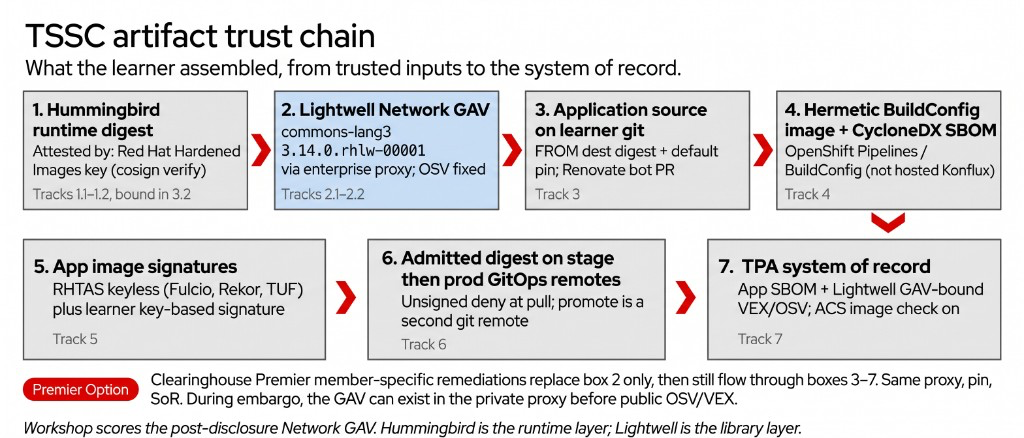
These labs walk a trusted software supply chain on this OpenShift Security Roadshow cluster. You verify a signed Hummingbird runtime, consume Lightwell application libraries through an enterprise proxy, bind those pins in source, build without the public internet, sign and attest the image, promote only that digest, then keep proof in Trusted Profile Analyzer and Advanced Cluster Security.
This is a product deep-dive, not a 101, 201, or 301 skill level. Work the labs in order. Hands-on work starts at 1.1 Verify Hummingbird.
The lab application is Java (Maven). Where the same control applies to Python (pip) or Artifactory, that page says so in one sentence.
Why it matters
Scanners tell you what is wrong. They do not give you a signed runtime, a patched library you can actually consume, or a path that keeps that proof through build, sign, and promote.
Public indexes and mutable tags are convenient. They are not a trusted input. A production container still has to answer what went into the image, who built and signed it, and whether known vulnerabilities were remediated on the versions you already run.
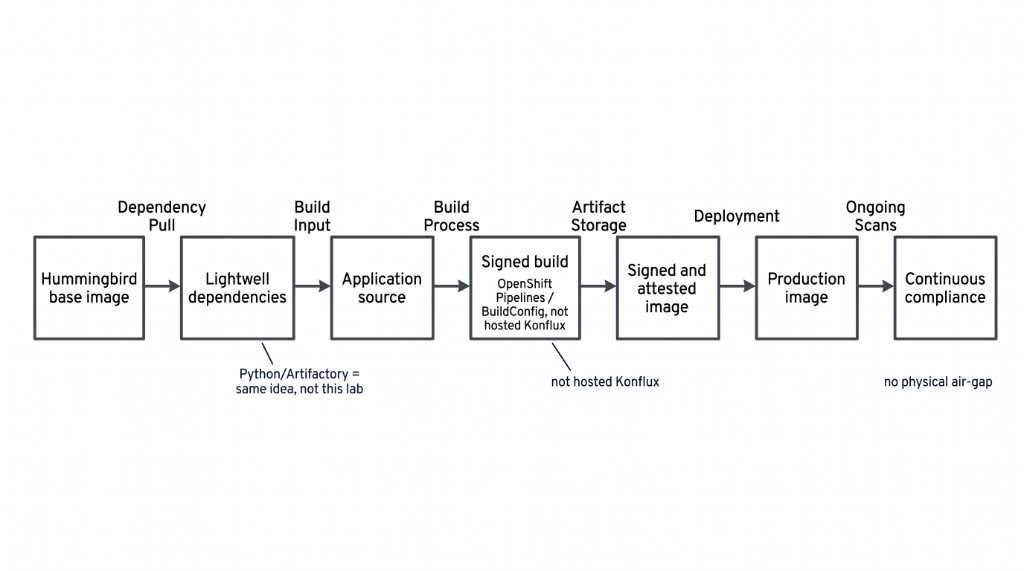
Lightwell covers third-party application dependencies (libraries, frameworks, build tools, and transitive deps). Red Hat Hardened Images (Hummingbird) are the runtime foundation. OpenShift, RHEL, and RHACS still cover the platform. Lightwell does not replace those products.
What does it solve
-
CVE findings on libraries you cannot jump to “latest” because of certification, compatibility, or a release window
-
Application builds that pull from the public internet instead of a trusted enterprise repository
-
Runtime bases that were never signature-checked before they entered the cluster
-
Images that reach production without a digest pin, a signature, or an SBOM
-
Builds that succeed only because Maven Central or a public registry was reachable
-
No system of record for what shipped, what was fixed, and what ACS should treat as remediated
How Lightwell and TSSC fit together
A trusted software supply chain (TSSC) is the set of controls that keep those answers attached to every production container.
Red Hat TSSC on OpenShift uses
-
Signed and attested artifacts from Red Hat Trusted Artifact Signer
-
SBOMs and advisories in Red Hat Trusted Profile Analyzer
-
Runtime and pipeline policy with Red Hat Advanced Cluster Security and Conforma / Enterprise Contract
-
Promotion with OpenShift GitOps
-
A golden path for developers in Red Hat Developer Hub
This same stack powers Red Hat Trusted Application Pipeline.
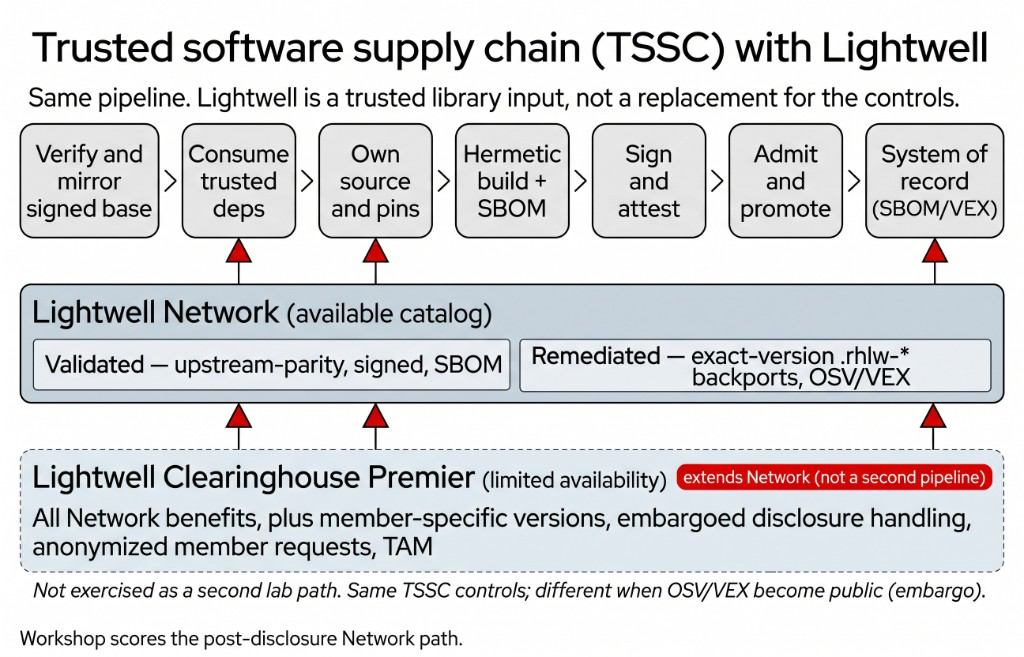
TSSC does not start at the pipeline. It starts with inputs you can name. A signed runtime base. Application libraries from a trusted repository. Source that binds those pins.
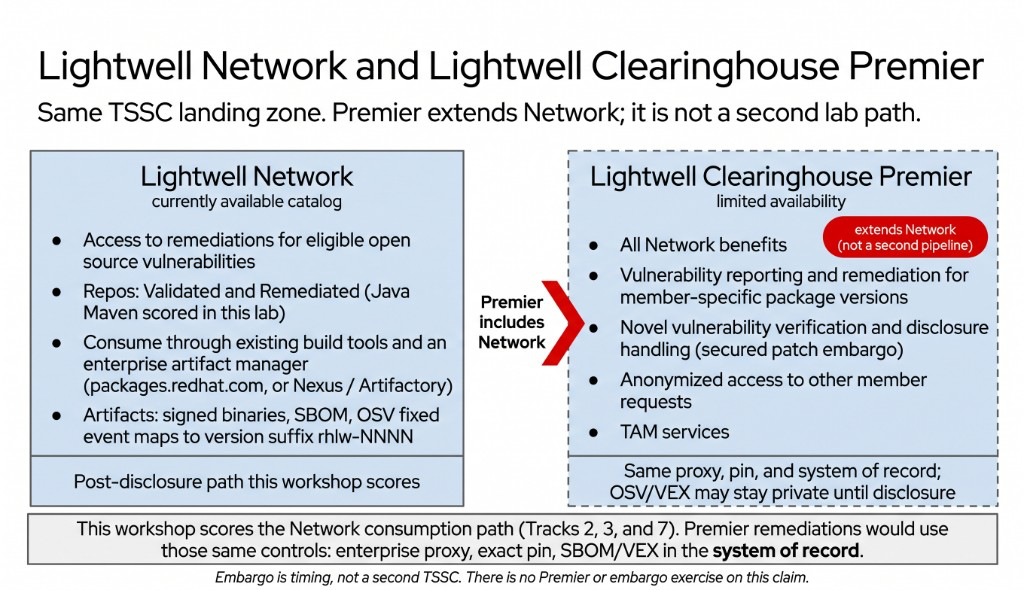
Lightwell is an annual subscription with two models. This workshop uses the Lightwell Network path (public, post-disclosure remediations). Lightwell Clearinghouse Premier adds member-specific package versions and disclosure handling. A Premier remediation still uses the same proxy, pin, hermetic build, and TPA or ACS evidence.
| Model | What you get | Challenge it addresses |
|---|---|---|
Lightwell Network (available) |
Remediations for eligible open source vulnerabilities. Validated repositories stay at upstream-parity (signed, with SBOM). Remediated repositories back-port security-only fixes with a |
You need a patched library on the version you already run, not a major upgrade. Tracks 2, 3, and 7. Docs are Choose the right repository and Configure your Java build tool. Console is https://console.redhat.com/lightwell. |
Lightwell Clearinghouse Premier (limited availability) |
All Network benefits, plus remediation for member-specific package versions, novel vulnerability verification, secured patch embargoes, anonymized access to other member requests, and TAM services. |
Your pinned version is not in the public catalog, or the fix must stay in a closed set until a public disclosure date. Same TSSC controls as Network. This cluster does not include a live Premier membership. |
An embargo is a coordinated-disclosure window. The vulnerability and its patch stay in a closed member set until a public date. Clearinghouse Premier can deliver that member pin during the window. Lightwell Network’s documented lifecycle ends at public Disclosure (VEX and OSV to the broader ecosystem). See Patch delivery lifecycle.
More background is in Lightwell concepts.
Recommended sequence
Complete the tracks in order. Later labs assume the earlier pins, signatures, and GitOps commits are already in place.
On each numbered page, Your change is the edit you make. Check is the commands that should succeed afterward. Do both before you continue.
Labs index
| Lab | Title | Challenge it addresses |
|---|---|---|
Verify Hummingbird |
Runtime bases that were never signature-checked |
|
Mirror into the trust boundary |
Catalog images that never entered your registry |
|
Enterprise proxy |
Builds that pull libraries from Maven Central |
|
Remediated pin |
“Upgrade to latest” when you must stay on a certified version |
|
Golden-path source |
Application source that is not yours to pin and promote |
|
Bind base and deps |
Dockerfiles and Maven pins that still float |
|
Live Renovate |
Manual pin edits that drift from the remediation catalog |
|
Source forbid-list |
Public |
|
Prefetch (Hermeto mapping) |
Dependencies fetched from the internet at build time |
|
Build NetworkPolicy |
Build pods that can egress anywhere |
|
Build and SBOM |
Production images with no SBOM |
|
Sign (keyless) |
Application images with no signature |
|
Attest + Conforma |
Policy that never fails, so unsigned work still ships |
|
Disconnected verify |
No way to verify a signature when public key servers are out of reach |
|
GitOps + admission |
Unsigned images that still deploy to the cluster |
|
Promote to prod repo |
Production that is not a separate, digest-pinned promote |
|
SBOM system of record |
No durable record of what the promoted digest contains |
|
VEX blast radius + ACS |
Scanner noise with no GAV-bound VEX, and ACS left out of the story |
What this workshop does not include
You walk one Java (Maven) supply chain on this OpenShift environment. The items below are out of scope on purpose.
| Not in this workshop | What you do instead |
|---|---|
Hosted Konflux |
Builds run as OpenShift Pipelines (the Task and BuildConfig names on the cluster). Equivalent Konflux names are in Konflux mapping. Do not install Konflux here. |
A physical air-gap or data diode |
This environment stays on the network. 5.3 is the key-based sign and verify procedure. Disconnected transfer is a simulated file drop, not USB or a diode. |
Building Project Hummingbird images |
You verify and consume published Red Hat Hardened Images. You do not rebuild the factory that produces them. |
FIPS certification in the lab |
FIPS is a product claim on the image you consume. This workshop does not rebuild an image to produce FIPS evidence. |
JFrog Artifactory, or a Python (FastAPI) application |
The lab application is Java. Nexus is the enterprise proxy you configure. Short callouts cover |
A live Clearinghouse Premier membership, member-specific GAV, or embargo window |
You practice the post-disclosure Network pin and the TSSC controls Premier would reuse (private proxy, exact pin, system of record). You do not request a member-only package on this cluster. Concept is in Lightwell concepts. |
A production virtual machine |
You promote a signed container digest through GitOps (6.1, 6.2). The same digest can later run on bootc or Satellite. There is no VM to boot here. |
How checks work
Every lab ends with a Check. It is a Job in lw-poc-validate. You set a short report token, run the Job, and read the logs.
-
CHECK PASSEDmeans you can continue. -
CHECK FAILEDnames what to fix. There is no Solve. Delete the Job and run it again after you fix it.
Practice on this overview Check. It only grades the report token. It does not count as 1.1.
Create the practice objects on this cluster (safe to re-run). Then leave the token as REPLACE_ME and the Job fails. Set it to checks-work and run the Job again. Expect CHECK PASSED.
NS=lw-poc-validate
oc get namespace "${NS}" >/dev/null
if ! oc -n "${NS}" get configmap report-00-check-demo >/dev/null 2>&1; then
  oc -n "${NS}" create configmap report-00-check-demo \
    --from-literal=module=00 \
    --from-literal=title='How checks work' \
    --from-literal=check_flow=REPLACE_ME
fi
cat >/tmp/job-00.yaml <<'EOF'
apiVersion: batch/v1
kind: Job
metadata:
  name: validate-00-check-demo
  namespace: lw-poc-validate
spec:
  backoffLimit: 0
  activeDeadlineSeconds: 60
  ttlSecondsAfterFinished: 86400
  template:
    spec:
      restartPolicy: Never
      serviceAccountName: validate-jobs
      containers:
        - name: check
          image: registry.redhat.io/openshift4/ose-cli:latest
          command:
            - /bin/bash
            - -ec
            - |
              echo "=== Validate Job 00. How checks work ==="
              TOKEN="$(oc -n lw-poc-validate get configmap report-00-check-demo -o jsonpath='{.data.check_flow}' 2>/dev/null || true)"
              if [[ -z "${TOKEN}" || "${TOKEN}" == "REPLACE_ME" ]]; then
                echo "CHECK FAILED: report-00-check-demo key check_flow is still REPLACE_ME. Set it to checks-work, then re-run this Job."
                exit 1
              fi
              if [[ "${TOKEN}" != "checks-work" ]]; then
                echo "CHECK FAILED: report-00-check-demo key check_flow must be checks-work (got '${TOKEN}')."
                exit 1
              fi
              echo "CHECK PASSED: report token is set. Lab Checks use this same Job flow."
EOF
oc -n "${NS}" create configmap validate-job-demo-templates \
  --from-file=job-00.yaml=/tmp/job-00.yaml \
  --dry-run=client -o yaml | oc apply -f -
echo "Practice Check objects are ready."The Job also grades ConfigMap report-00-check-demo key check_flow. Set it to checks-work. Empty or REPLACE_ME fails even if cluster state is correct. Do not copy validate-docs.
oc -n lw-poc-validate edit configmap report-00-check-demoThe scored Check is Job validate-00-check-demo in lw-poc-validate. Direct nav URLs still work (honor system). Unlimited retries. There is no Solve.
oc -n lw-poc-validate delete job validate-00-check-demo --ignore-not-found
TPL='job-00.yaml'
oc -n lw-poc-validate get configmap validate-job-demo-templates \
  -o go-template="{{ index .data \"${TPL}\" }}" | oc create -f -
oc -n lw-poc-validate logs -f job/validate-00-check-demo
Expect CHECK PASSED: before you continue. CHECK FAILED: names the object to fix. Delete the Job and create it again as often as you need.
Lab Checks use the same Job flow. Each lab also grades a scored object from Your change.
Before you start
-
This guide runs in the RHDP Showroom (lab nav plus embedded terminal) or the bastion SSH session.
-
ocis on the bastion by default.cosign,oc-mirror, andecare installed by the Welcome Environment setup block into~/.local/bin(Red Hat images, not GitHub). Runsource ~/.bashrcifcommand -v cosignprints nothing. -
Console URLs and passwords for Gitea, Keycloak, RHTPA, and Developer Hub are on Welcome. CLI steps still discover hosts from
demo-userinfo-*ConfigMaps. Do not invent Route hosts. Do not use GitHub as lab git. Gitea is in-cluster. -
Checks are Validate Jobs in
lw-poc-validate. The practice Check above is how you run one. -
Never commit credentials (
LW_USERNAME/LW_PASSWORD,student_password,cosign.key).
Related documentation
-
Lightwell (Network and Clearinghouse Premier)
-
Technologies behind Trusted Application Pipeline (RHTAS, RHTPA, RHDH)
-
Trusted Artifact Signer deployment guide (includes Conforma /
ec)
Start here
Open 1.1 Verify Hummingbird when you are ready to work.